Research / Field guide
How to Get Advanced Tech Points in Star Trek: Outposts Unknown
An Advanced Laboratory needs advanced samples. Reach Ops level 6 for the Planetary Sensor, find Advanced Research nodes, collect their samples, then run Research Advanced Tech Point.
Complete the sample chain
Ops 6 → Planetary Sensor → Advanced Research node → advanced sample → Advanced Laboratory → Advanced Tech Points
An Advanced Laboratory can be available before the sensor needed to find its samples. Building the laboratory alone does not supply its input.
Find an Advanced Research node
Build a Planetary Sensor and keep it powered. Look within its detection area for research markers, then select the object and check that its title is Advanced Research.
An orange downward marker with purple contents can help you spot the object, but its selected title is the more useful check. Do not assume every ordinary exploration point produces the right sample.
Collect the right sample
Assign Science crew to the Advanced Research node and provide Tricorders. Let the research task run and check the sample output.
The yellow advanced-sample icon is an input material. It is different from ordinary samples and from the Advanced Tech Points produced later in the laboratory.
Process it in the Advanced Laboratory
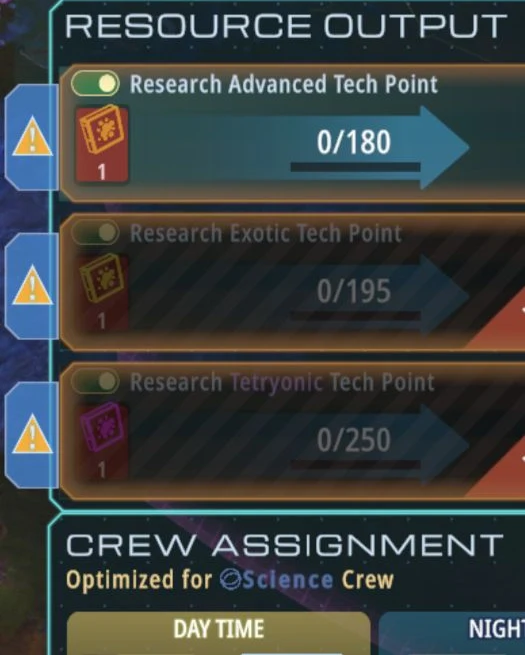
- Open Resource Output at the Advanced Laboratory.
- Enable Research Advanced Tech Point.
- Check that the matching advanced samples have been delivered.
- Keep the laboratory operating with crew assigned to the active shift.
- Look for the missing-resource warning to clear, the recipe to progress, and the point total to increase.
“Lacking Resources” is a reason to check the recipe’s input, not proof that the entire research system is broken.
If the marker never appears
Check your game updates, sensor power, coverage and the node’s selected title. Earlier versions had issues involving exploration markers and research unlocks; 1.0.2 included a fix for markers being visible when unlocked.
There is no fixed waiting time or guaranteed reload trick to rely on. If the chain is complete but the marker or recipe remains stuck, preserve the precise game state when investigating the fault.