Construction / Field guide
How to Prioritize the Job Queue in Star Trek: Outposts Unknown
Open Crew Overview → Tasks → Job Queue. Select the urgent job and use the top ordering arrow on the right to move it to the front.
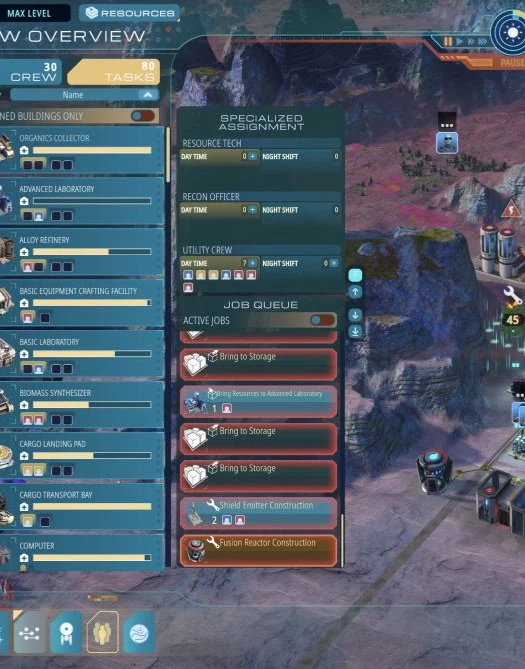
Move the job to the front
- Open Crew Overview.
- Switch to Tasks and find Job Queue.
- Select the construction task you need first.
- Use the uppermost ordering arrow to the right of the task list.
That arrow changes job priority; it is easy to mistake it for a control that only scrolls the list. Check that the selected task moves forward in the queue.
Leave crew available to do the work
Materials being delivered does not mean construction will start immediately. Check Utility Crew assignments and whether someone is available to build or haul.
Move one genuinely urgent task ahead of the others. Marking everything urgent does not create more workers.
Priority is not a fix for every stalled task
Update 1.0.2 addressed difficulty clicking the Prioritize button. Repairs, destroyed buildings and blocked deliveries can have separate causes; 1.0.3 included fixes for some of those cases.
If a task is already first, inspect its materials and crew before changing priorities again.